
Remote Editor SOP
Role-specific operating standards for remote editors working on Maximaaz projects.
- maximaazadmin
- September 5, 2026
- 2:04 pm
WHY THIS SOP EXISTS Maximaaz expects editors to bring their own craft, judgement and workflow. This SOP standardises the parts of production that affect the team, the project and the client. |
BRIEF → FOOTAGE → EDIT → REVIEW → COLOUR → FINAL QA → DELIVERY → ARCHIVE
QUICK NAVIGATION
01 / YOUR RESPONSIBILITY
WHEN I RECEIVE A JOB, I AM RESPONSIBLE FOR… Taking the assigned work from brief to the next agreed stage, keeping the project organised, communicating blockers early and leaving a clean handoff for Maximaaz. |
- Read the brief, deliverables, deadline, references and required formats.
- Confirm footage/assets are available before starting.
- Set up and maintain the project using the Maximaaz folder structure.
- Keep files, versions and working media organised on your machine.
- Update Project Manager / Account Manager before starting and before logging off.
- Communicate download, upload, storage or connectivity blockers early.
- Prepare clean handoffs for review, colour, another editor or delivery.
- Complete QA before marking work ready.
02 / YOUR WORKFLOW, OUR STANDARD
YOU ARE EXPECTED TO WORK INDEPENDENTLY We do not prescribe your editing technique, shortcuts or personal desktop setup. We standardise the things that affect the team, project and client. |
- Where project files live.
- How files are named.
- How versions are identified.
- How work is handed off.
- How work is delivered.
- How client and Maximaaz assets are protected.
WHY THE FOLDER SYSTEM EXISTS A remote project may move between people who have never worked beside each other. The structure lets another person locate, open, continue and deliver the work without a live explanation from you. |
START EVERY PROJECT WITH THE MAXIMAAZ FOLDER TEMPLATE
A blank Maximaaz project folder structure will be shared on Google Drive. Download it, unzip it and use that folder as the starting point for every project. Do not recreate the structure from memory when the template is available.
This makes the folder system faster to follow and reduces the chance of missing a required folder.
03 / MAXIMAAZ FOLDER STRUCTURE
We use two different folder environments. Keep them separate:
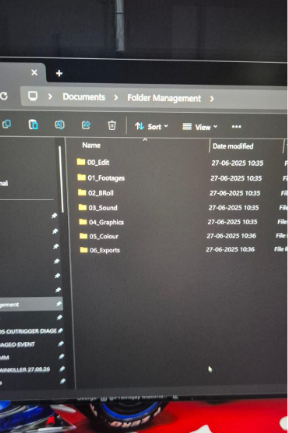
A. EDIT / LOCAL PROJECT STORAGE This is the working structure used for editing, project files and production assets. It is the structure shown below and should be maintained on the editor’s working storage. |
00_Edit
01_Footages
02_BRoll
03_Sound
04_Graphics
05_Colour
06_Exports
For remote editors, this structure must exist on the local working drive before editing begins. Do not use Downloads/Desktop as the permanent project location.
For ease of use, here is a link with this folder structure already in place. Download, Unzip the package on your local drive. Rename the main folder with project name and start using the same structure.
Link: Click here
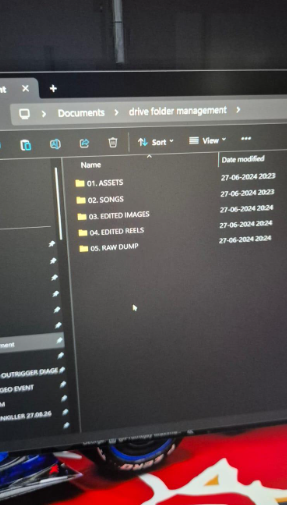
B. GOOGLE DRIVE / CLIENT-FACING STORAGE Google Drive is the shared/client-facing storage structure. It is not a replacement for the local working project structure. |
- ASSETS
02. SONGS
03. EDITED IMAGES
04. EDITED REELS
05. RAW DUMP
IMPORTANT Do not mix the two systems. The local/edit structure is for production. The Google Drive structure is for shared/client-facing assets and deliverables. If a project requires a different setup, follow the project-specific instruction from the producer/operations lead. |
04 / REMOTE FILE HANDLING + GOOGLE DRIVE
DOWNLOADING FOOTAGE
- Download only from approved Maximaaz/client locations.
- Use temporary staging if needed; move project material into the 00_Edit / 01_Footages etc. structure before editing.
- Never rename camera originals.
- Never edit directly from Downloads/Desktop/browser cache.
- Confirm downloads are complete and readable.
- Keep enough local storage for footage, cache and project files.
GOOGLE DRIVE / CLIENT SHARING
- Upload only the files intended for the client/shared Drive.
- Place files in the correct folder: Assets, Songs, Edited Images, Edited Reels or Raw Dump, as instructed.
- Do not upload working project files, cache or unnecessary internal material to the client-facing Drive.
- Check the uploaded file after transfer and confirm the correct version is present.
RULE Local project structure = work. Google Drive = shared/client-facing storage. Do not use one as a substitute for the other. |
05 / UPLOADS + HANDOFFS
- Export to 06_Exports before uploading.
- Check filename/version.
- Watch the exported file.
- Upload to the approved review/delivery location.
- Confirm the uploaded file is correct.
- Do not leave the only important copy in a temporary transfer location.
START OF DAY Before logging into the working system, Connect with your Project manager / Account Manager. Review assigned jobs, priorities and deadlines, then update the relevant task. |
END OF DAY Before logging off, update what was completed, current version, next action and any blocker. Keep it brief. Your Project Manager / Account Manager is the operational point of contact for project status. |
06 / RESOLVE + VERSIONING
TO RESOLVE ToResolve_ProjectName_YYYYMMDD_v01 |
FROM RESOLVE FromResolve_ProjectName_YYYYMMDD_v01 |
- Send the correct edit/picture-lock version to colour.
- Use the agreed high-quality intermediate codec.
- Keep edit and colour versions traceable.
- Use the matching FromResolve version when colour returns.
- Never overwrite a version already sent for review or approved.
07 / SECURITY + PROPRIETARY ASSETS
REMOTE SECURITY Your machine, network and storage are part of the production environment. Protect client material and Maximaaz assets as company property. |
- Use approved storage and transfer systems.
- Keep device and project credentials secure; use 2FA where available.
- Do not move client/project files to personal cloud storage or unauthorised drives.
- Do not create public links or share files outside authorised people.
- Do not upload confidential client material to unapproved AI/third-party services.
- Report accidental exposure, loss or misdelivery immediately.
MAXIMAAZ PROPRIETARY ASSETS LUTs, presets, effects, MOGRTs, AE templates, scripts, graphics systems, internal tools and workflows are for authorised Maximaaz work only. No personal projects, freelance work, other clients, sharing, selling, publishing or unauthorised distribution. Access does not transfer ownership. |
08 / DEFINITION OF DONE
A JOB IS NOT COMPLETE WHEN THE TIMELINE IS FINISHED. A job is complete when the work is organised, delivered, secure and ready for the next person. |
- ✓ Correct version exported.
- ✓ Export watched.
- ✓ Required files stored correctly.
- ✓ Project can be reopened.
- ✓ Required assets are present.
- ✓ Correct file uploaded/delivered.
- ✓ Your Project Manager / Account Manager has been updated with the current status.
- ✓ No unnecessary copies, cache, renders or temporary files remain in the submitted project.
- ✓ Project is ready for the next person.
THE REMOTE HANDOFF TEST Could another Maximaaz editor or producer continue the project without calling you to ask where the files are, which version is current or what happens next? |